
- Slevy a akce
- Počítače a notebooky
- Telefony a tablety
- Elektronika
 Kabely a redukce
- USB
- Audio-Video
- Anténní
- Cestovní adaptéry
- Datové a paralelní
- DisplayPort
- DVI
- Firewire
- Flexo kabely
- HDMI
- Koaxiální
- Kabely pro iPhone/iPad
- Konektory - audio,video,Tv
- Metráž k propojení reprosoustav
- Napájecí 230V k PC
- Organizéry kabelů
- Prodlužovací kabely a přívody 230V
- Přepěťové ochrany
- Převodníky, rozbočovače, switche, splittery
- PS/2
- Redukce
- Serial ATA (SATA)
- Sériové
- Síťové (LAN, RJ-45, Patch, 305m, 500m, box)
- Speciální prodlužovací přívody - PowerCube
- Testery kabelů
- VGA (D-SUB)
- Zásuvkové lišty a moduly
 Auto - moto
- Autonosiče na jízdní kola
- USB nabíječky do auta
- Automobilové kamery
- Autorádia
- Autodiagnostiky
- Nabíječky autobaterií
- Autochladničky
- Alkohol testery
- FM Transmittery
- Autokosmetika
- Antiradary
- Měniče napětí
- Upínače a popruhy
- Škrabky a lopatky
- Parkovací senzory
- Vůně do auta
- Přezouvání pneumatik
- Komfortní výbava
- GPS navigace
- Gaming
- Velké spotřebiče
- Domácnost
 Malé spotřebiče
- Kávovary a espresso
- Rychlovarné konvice
- Kuchyňské roboty
- Mixéry a šlehače
- Mikrovlnné trouby
- Minitrouby
- Domácí pekárny
- Elektrické grily
- Toustovače
- Topinkovače
- Vaflovače
- Fritézy
- Rýžovary
- Multifunkční hrnce
- Sous vide
- Plotýnkové vařiče
- Odšťavňovače a lisy
- Elektrické mlýnky na maso
- Kráječe potravin
- Sekáčky a struhadla
- Sušičky ovoce
- Vakuovačky
- Autochladničky
- Vychytávky do kuchyně
- Vysavače
- Parní čističe
- Žehličky
- Úprava vzduchu
- Dílna a zahrada
 Auto-moto
- Autonosiče jízdních kol
- Autostany
- Markýzy k autu
- USB nabíječky do auta
- Automobilové kamery
- Autorádia
- Autodiagnostiky
- Nabíječky autobaterií
- Nabíječky elektromobilů
- Autochladničky
- Alkohol testery
- FM Transmittery
- Autokosmetika
- Organizéry do auta
- Antiradary
- Měniče napětí
- Upínače a popruhy
- Ochrany čelního skla
- Škrabky a lopatky
- Parkovací senzory
- Vůně do auta
- Přezouvání pneumatik
- Komfortní výbava
- GPS navigace
 Zahradní technika
- Akumulátorové nůžky
- Čerpadla
- Drtiče a štípače
- Infrazářiče, topidla
- Křovinořezy
- Kultivátory
- Lapače hmyzu
- Lisy na ovoce
- Odstraňovače plevele
- Plotostřihy
- Postřikovače
- Příslušenství
- Ruční zametače
- Řetězové pily
- Sběrače listí
- Sekačky na trávu
- Vertikutátory – provzdušňovače trávníku
- Vysavače na listí
- Vysokotlaké čističe
- Zahradní fukary na listí
- Zahradní vozíky
- Zemní vrtáky
- Cyklo a sport






























































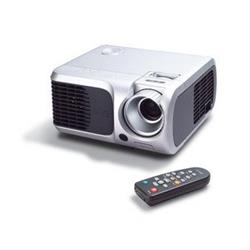
ACER DLP projektor PD100S, 2100 Lum,SVGA 800x600, 2000:1,ZOOM,31dB
Objednací kód: 502032,Part No.: EY.J3801.001,Záruka spotřebitel/ostatní: 24 měsíců / 24 měsíců

Je nám líto,
ale tento produkt je beznadějně vyprodán a nebo je pouze dostupný jako dárek k vybranému výrobku. Vyberte si, prosím, ze související nabídky níže.
Popis
PD100S, ADVAN. DLP, ZOOM, SVGA 800X600, 2.3KG, '2000:1, 2100 LUMENS, 31db
Specifications Acer PD100S
Projection System DLP™
Resolution "Native SVGA (800 x 600), Maximum SXGA (1,280 x 1,024)"
Computer Compatibility IBM PC and Compatibles, Apple Macintosh, iMac, and VESA Standards SXGA, XGA, VGA (resizing)
Video Compatibility NTSC (3.58/4.43), PAL (B/D/G/H/I/M/N), SECAM (B/D/G/K/K1/L), HDTV (720p, 1080i), EDTV (480p, 576p), SDTV (480i, 576i)
Aspect Ratio 4:3 (Native), 16:9
Contrast Ratio 2000:1
Displayable Colors 16.7 Million Colors
Brightness 2,100 ANSI Lumens (Standard), 1,680 ANSI Lumens (ECO)
Projection Lens F / 2.7 ~ 3.0, f = 21.83mm ~ 23.81mm, 1:1.1 Manual Zoom and Manual Focus
Projection Screen Size (Diagonal) 34.7” (0.88m) ~ 304.9” (7.75m)
Projection Distance 4.92’ (1.5m) ~ 39.4' (12m)
Throw Ratio 51"@2m
Horizontal Scan Rate 31.5 ~ 100 kHz
Vertical Refresh Scan Rate 56 ~ 85 Hz
Lamp Type 200 W User Replaceable UHP Lamp
Lamp Life 2,000 Hours (Standard), 3,000 Hours (ECO)
Keystone Correction +/-16 Degrees
Projection Mode Front, Rear, Front-Ceiling, Rear-Ceiling
Audio One Internal Speaker with 2 watts Output
Weight 4.8 lbs (2.17Kg)
Dimension 230 x 238 x 123 mm (9.1" x 9.4" x 4.8")
IR Remote Control Laser Pointer & PgUp/PgDn function
Digital Zoom Yes
Picture in Picture N/A
Wireless N/A
Power Supply AC Input 100~240V auto-switching power supply
Power Consumption 253 Watts
Operation Temperature 5°C ~ 35°C / 41°F ~ 95°F
Noise Level 31 dBA (Standard mode), 27 dBA (ECO mode)
Uniformity 90%
Other Features
1. Empower Key - A quick button on remote control or projector control panel for user easily to perform the following three Acer unique features.
2. Acer eView Management - A feature which allows user easily to select the optimal display mode for specific display content.
3. Acer eTimer Management - A feature which allows user to enable a Timer function during the presentation. A digit clock will be displayed on the screen while the timer is in counting. A reminder on the screen and an alarm sound will be activated when time is up.
4. Acer eOpening Management - A feature which allows user to customized their desired projector startup screen.
5. Auto Shutdown - A feature which allows the projector automatically turned off according to the setting time via OSD if the projector continuously no signal input
6. Alarm sound - A feature which enables the projector to play the alarm sound under various conditions described below: a) Projector turn on b) Projector turn off c) Time is up for the eTimer function d) Projector function error
7. Quick Start - The projector starts projecting within 15 seconds after power button being pressed
8. Quick Shutdown - The projector shuts down within 30 seconds after power button being pressed
9. Security - A feature which enables the password control capability of the projector. It prevents the projector from unauthorized usage. Also, it reduces the possibility of the projector's being stolen
I/O Connectors
Computer Input:
• 1 HDB 15-Pin D-Sub (VGA/Component/HDTV)
• 1 3.5mm Audio Mini Jack
AV Input:
• 1 HDB 15-Pin D-Sub (VGA/Component/HDTV, same as above)
• 1 Composite Video RCA Jack
• 1 S-Video Mini DIN
• 1 3.5mm Audio Mini Jack (Same as above)
Output:
• 1 15-Pin D-Sub for Monitor Loop Through
• 1 USB Connector for Remote Computer Control
• 1 5-Volts DC Output Power Jack
Standard Accessories - příslušenství v balení:
AC Power Cord
VGA Cable (15pin D-Sub)
Composite Video Cable (RCA)
S-Video Cable
VGA (D-Sub) to Component / HDTV Adapter
USB Cable
Audio Cable (Mini to Mini Phone Jack)
Remote Control with Laser Pointer & PgUp/PgDn function
Batteries x 2 for Remote Controller
User's Guide (CD-ROM)
Quick Start Card
Lens Cap
Carrying Case
Záruka
Máte problém se zakoupeným výrobkem v záruční lhůtě? S reklamací se můžete obrátit přímo na autorizovaný servis. Vyřízení reklamace může být o několik dnů rychlejší, protože se zboží nemusí přepravovat mezi servisem a obchodem, jste v přímém kontaktu s reklamačním technikem a váš problém můžete konzultovat přímo s kompetentní osobou.
V žádném případě se nezříkáme odpovědnosti reklamovat zboží, pouze nabízíme možnost rychlejšího vyřízení.
Informace o autorizovaném servisu
Servisní centrum CT Park