
- Slevy a akce
- Počítače a notebooky
- Telefony a tablety
- Elektronika
 Kabely a redukce
- USB
- Audio-Video
- Anténní
- Cestovní adaptéry
- Datové a paralelní
- DisplayPort
- DVI
- Firewire
- Flexo kabely
- HDMI
- Koaxiální
- Kabely pro iPhone/iPad
- Konektory - audio,video,Tv
- Metráž k propojení reprosoustav
- Napájecí 230V k PC
- Organizéry kabelů
- Prodlužovací kabely a přívody 230V
- Přepěťové ochrany
- Převodníky, rozbočovače, switche, splittery
- PS/2
- Redukce
- Serial ATA (SATA)
- Sériové
- Síťové (LAN, RJ-45, Patch, 305m, 500m, box)
- Speciální prodlužovací přívody - PowerCube
- Testery kabelů
- VGA (D-SUB)
- Zásuvkové lišty a moduly
 Auto - moto
- Autonosiče na jízdní kola
- USB nabíječky do auta
- Automobilové kamery
- Autorádia
- Autodiagnostiky
- Nabíječky autobaterií
- Autochladničky
- Alkohol testery
- FM Transmittery
- Autokosmetika
- Antiradary
- Měniče napětí
- Upínače a popruhy
- Škrabky a lopatky
- Parkovací senzory
- Vůně do auta
- Přezouvání pneumatik
- Komfortní výbava
- GPS navigace
- Gaming
- Velké spotřebiče
- Domácnost
 Malé spotřebiče
- Kávovary a espresso
- Rychlovarné konvice
- Kuchyňské roboty
- Mixéry a šlehače
- Mikrovlnné trouby
- Minitrouby
- Domácí pekárny
- Elektrické grily
- Toustovače
- Topinkovače
- Vaflovače
- Fritézy
- Rýžovary
- Multifunkční hrnce
- Sous vide
- Plotýnkové vařiče
- Odšťavňovače a lisy
- Elektrické mlýnky na maso
- Kráječe potravin
- Sekáčky a struhadla
- Sušičky ovoce
- Vakuovačky
- Autochladničky
- Vychytávky do kuchyně
- Vysavače
- Parní čističe
- Žehličky
- Úprava vzduchu
- Dílna a zahrada
 Auto-moto
- Autonosiče jízdních kol
- Autostany
- Markýzy k autu
- USB nabíječky do auta
- Automobilové kamery
- Autorádia
- Autodiagnostiky
- Nabíječky autobaterií
- Nabíječky elektromobilů
- Autochladničky
- Alkohol testery
- FM Transmittery
- Autokosmetika
- Organizéry do auta
- Antiradary
- Měniče napětí
- Upínače a popruhy
- Ochrany čelního skla
- Škrabky a lopatky
- Parkovací senzory
- Vůně do auta
- Přezouvání pneumatik
- Komfortní výbava
- GPS navigace
 Zahradní technika
- Akumulátorové nůžky
- Čerpadla
- Drtiče a štípače
- Infrazářiče, topidla
- Křovinořezy
- Kultivátory
- Lapače hmyzu
- Lisy na ovoce
- Odstraňovače plevele
- Plotostřihy
- Postřikovače
- Příslušenství
- Ruční zametače
- Řetězové pily
- Sběrače listí
- Sekačky na trávu
- Vertikutátory – provzdušňovače trávníku
- Vysavače na listí
- Vysokotlaké čističe
- Zahradní fukary na listí
- Zahradní vozíky
- Zemní vrtáky
- Cyklo a sport




























































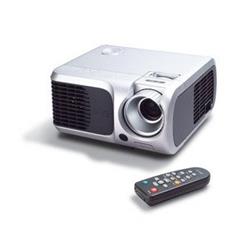
ACER DLP projektor PD100PD, 2200 Lum, SVGA 800x600, 2000:1, DVI, 31dB
Objednací kód: 502033,Part No.: EY.J3601.008,Záruka spotřebitel/ostatní: 24 měsíců / 24 měsíců

Je nám líto,
ale tento produkt je beznadějně vyprodán a nebo je pouze dostupný jako dárek k vybranému výrobku. Vyberte si, prosím, ze související nabídky níže.
Popis
PD100PD, ADVAN. DLP, ZOOM, SVGA 800X600, 2.3KG, '2000:1, 2200 LUMENS, 31db, DVI
Projection System DLP™
Resolution "Native SVGA (800 x 600),
Maximum SXGA (1,280 x 1,024)"
Computer Compatibility IBM PC and Compatibles, Apple Macintosh, iMac, and VESA Standards SXGA, XGA, VGA (resizing)
Video Compatibility NTSC (3.58/4.43), PAL (B/D/G/H/I/M/N), SECAM (B/D/G/K/K1/L), HDTV (720p, 1080i), EDTV (480p, 576p), SDTV (480i, 576i)
Aspect Ratio 4:3 (Native), 16:9
Contrast Ratio 2000:1
Displayable Colors 16.7 Million Colors
Brightness 2,100 ANSI Lumens (Standard), 1,680 ANSI Lumens (ECO)
Projection Lens "F / 2.7 ~ 3.0, f = 21.83mm ~ 23.81mm
1:1.1 Manual Zoom and Manual Focus"
Projection Screen Size (Diagonal) 34.7” (0.88m) ~ 304.9” (7.75m)
Projection Distance 4.92’ (1.5m) ~ 39.4' (12m)
Throw Ratio 51"@2m
Horizontal Scan Rate 31.5 ~ 100 kHz
Vertical Refresh Scan Rate 56 ~ 85 Hz
Lamp Type 200 W User Replaceable UHP Lamp
Lamp Life 2,000 Hours (Standard), 3,000 Hours (ECO)
Keystone Correction +/-16 Degrees
Projection Mode Front, Rear, Front-Ceiling, Rear-Ceiling
Audio One Internal Speaker with 2 watts Output
Weight 4.8 lbs (2.17Kg)
Dimension 230 x 238 x 123 mm (9.1" x 9.4" x 4.8")
IR Remote Control Laser Pointer & PgUp/PgDn function
Digital Zoom Yes
Picture in Picture N/A
Wireless N/A
Power Supply AC Input 100~240V auto-switching power supply
Power Consumption 253 Watts
Operation Temperature 5°C ~ 35°C / 41°F ~ 95°F
Noise Level 31 dBA (Standard mode), 27 dBA (ECO mode)
Uniformity 90%
Other Features "1. Empower Key
A quick button on remote control or projector control panel for user easily to perform the following three Acer unique features."
"2. Acer eView Management
A feature which allows user easily to select the optimal display mode for specific display content."
"3. Acer eTimer Management
A feature which allows user to enable a Timer function during the presentation. A digit clock will be displayed on the screen while the timer is in counting. A reminder on the screen and an alarm sound will be activated when time is up."
"4. Acer eOpening Management
A feature which allows user to customized their desired projector startup screen."
"5. Auto Shutdown
A feature which allows the projector automatically turned off according to the setting time via OSD if the projector continuously no signal input "
"6. Alarm sound
A feature which enables the projector to play the alarm sound under various conditions described below:
a) Projector turn on
b) Projector turn off
c) Time is up for the eTimer function
d) Projector function error"
"7. Quick Start
The projector starts projecting within 15 seconds after power button being pressed"
"8. Quick Shutdown
The projector shuts down within 30 seconds after power button being pressed"
"9. Security
A feature which enables the password control capability of the projector. It prevents the projector from unauthorized usage. Also, it reduces the possibility of the projector's being stolen"
I/O Connectors
Computer Input:
• 1 HDB 15-Pin D-Sub (VGA/Component/HDTV)
• 1 DVI connector
• 1 3.5mm Audio Mini Jack
AV Input:
• 1 HDB 15-Pin D-Sub (VGA/Component/HDTV, same as above)
• 1 Composite Video RCA Jack
• 1 S-Video Mini DIN
• 1 3.5mm Audio Mini Jack (Same as above)
Output:
• 1 15-Pin D-Sub for Monitor Loop Through
• 1 USB Connector for Remote Computer Control
• 1 5-Volts DC Output Power Jack
Standard Accessories
AC Power Cord
VGA Cable (15pin D-Sub)
Composite Video Cable (RCA)
S-Video Cable
VGA (D-Sub) to Component / HDTV Adapter
USB Cable
Audio Cable (Mini to Mini Phone Jack)
Remote Control with Laser Pointer & PgUp/PgDn function
Batteries x 2 for Remote Controller
User's Guide (CD-ROM)
Quick Start Card
Lens Cap
Carrying Case
Záruka
Máte problém se zakoupeným výrobkem v záruční lhůtě? S reklamací se můžete obrátit přímo na autorizovaný servis. Vyřízení reklamace může být o několik dnů rychlejší, protože se zboží nemusí přepravovat mezi servisem a obchodem, jste v přímém kontaktu s reklamačním technikem a váš problém můžete konzultovat přímo s kompetentní osobou.
V žádném případě se nezříkáme odpovědnosti reklamovat zboží, pouze nabízíme možnost rychlejšího vyřízení.
Informace o autorizovaném servisu
Servisní centrum CT Park